
Configuring how shoppers pay
A choice of payment plans
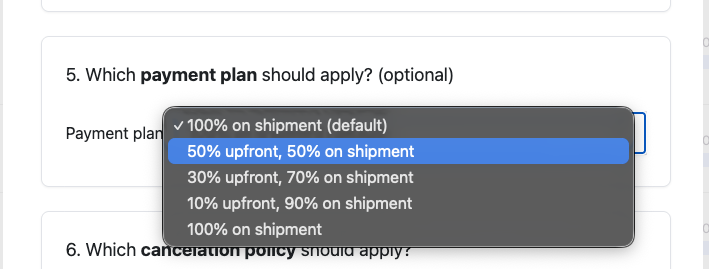
Shoppers can split their payment either 10%, 30% or 50% upfront as a deposit - and the rest on fulfilment.
This is a great option for brands that have a meaningful % of shoppers who use BNPL, as it allows shoppers to spread their payment so that not as much money is tied up upfront. It is also great for wholesale and other large AOV pre-orders.
How does it work?
Purple Dot vaults the customer card provided at checkout, and the card is auto-charged when pre-orders are exported to Shopify and ready to ship. Purple Dot also handles the shopper flow if the second charge fails and lets the shopper update their card details to complete the pre-order purchase.
How do I enable it?
Head to the Settings tab on the left-hand side dashboard and click Integration.
Under Checkout Settings, you can drop down and choose the split.
Hit Save.
This will be the default payment plan used by all future Waitlists you create.

It is possible to override the default and use a different payment plan when setting up a new Waitlist:
When does the customer get charged their second payment?
When you export the pre-orders to Shopify.
What if their card declines?
If the second charge fails, we email the shopper and allow them to update their card details to complete the pre-order purchase. If they do not update the details within the payment grace period configured in your Operations settings, their the pre-order is automatically canceled.
How does the customer change their payment details?
The shopper can update their card details using our Shopper Portal.